
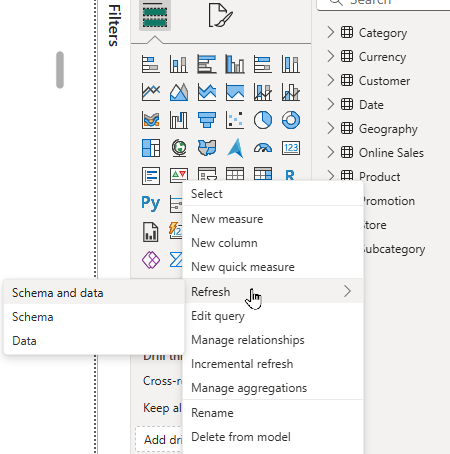
Microsoft, in the September release of Power BI Desktop, has added additional ways to start a refresh. You can click the Refresh button in Home ribbon, and now see options for Schema and Data, Schema and Data. If the source data has not had a schema update, choose the Data option.

This helps with connections that have large schemas where the schema refresh, before the data refresh, seems to make the data refresh run long, or timeout. Many users have voiced their opinion about this online. So, another request from the user bae has been implemented by Microsoft. THANKS!!!
 BONUS: You can also do this table by table, instead of the whole model.
I really like where Microsoft is going with updates to Power BI Desktop (and service) now that the drive for AI/Copilot have been implemented.
For more updates, go to this link – https://powerbi.microsoft.com/en-us/blog/power-bi-september-2024-feature-summary/
There is also a Fabric update link – https://blog.fabric.microsoft.com/en-US/blog/fabric-september-2024-monthly-update/


